Migration
Introduction to Migration
For environments using the Legacy Alert Manager (AM), Alert Manager Enterprise (AME) offers an import function to convert AM Incidents into AME Events.
Limitations
AME imports the following data:
- Incident Metadata
- Incident Results
- Incident Comments
- Incident Statuses
- Incident Tags
- Incident Groups
- Incident Categories
- Incident Subcategories
Conversions:
- Incident Groups → Tags
- Categories → Tags (format:
category:<category>) - Subcategories → Tags (format:
subcategory:<category>)
Not Imported:
- Notification Schemes
- Drilldown Actions
- External Workflow Actions
Importing Data
To import data, navigate to Administration > Setup and select the Migration tab.
- Choose the tenant for importing incidents.
tip
With Multi-Tenancy enabled, test the migration in a temporary tenant first.
info
Request trial keys for test migrations at <[email protected]>.
-
Select the scope for incident imports:
closed,resolved, orsuppressed. -
Set the time range.
caution
For incidents using the append feature, ensure the first occurrence falls after the start time to include them.
- Click
Startto begin the migration.
Verifying Migration
Imported events are identifiable by their description and history details:
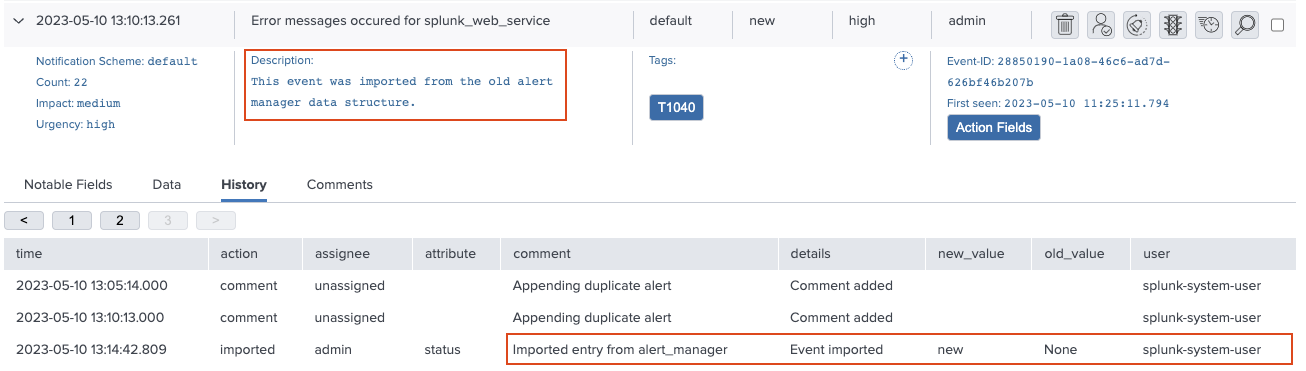
Check the migration log with this search:
index=_internal sourcetype=ame:task:migration